
A few days ago, a Linkly AI user shared a surprisingly useful workflow with us.
They connected WorkBuddy to Linkly AI and, in under 30 minutes, added an “AI teammate” to a WeCom group chat.
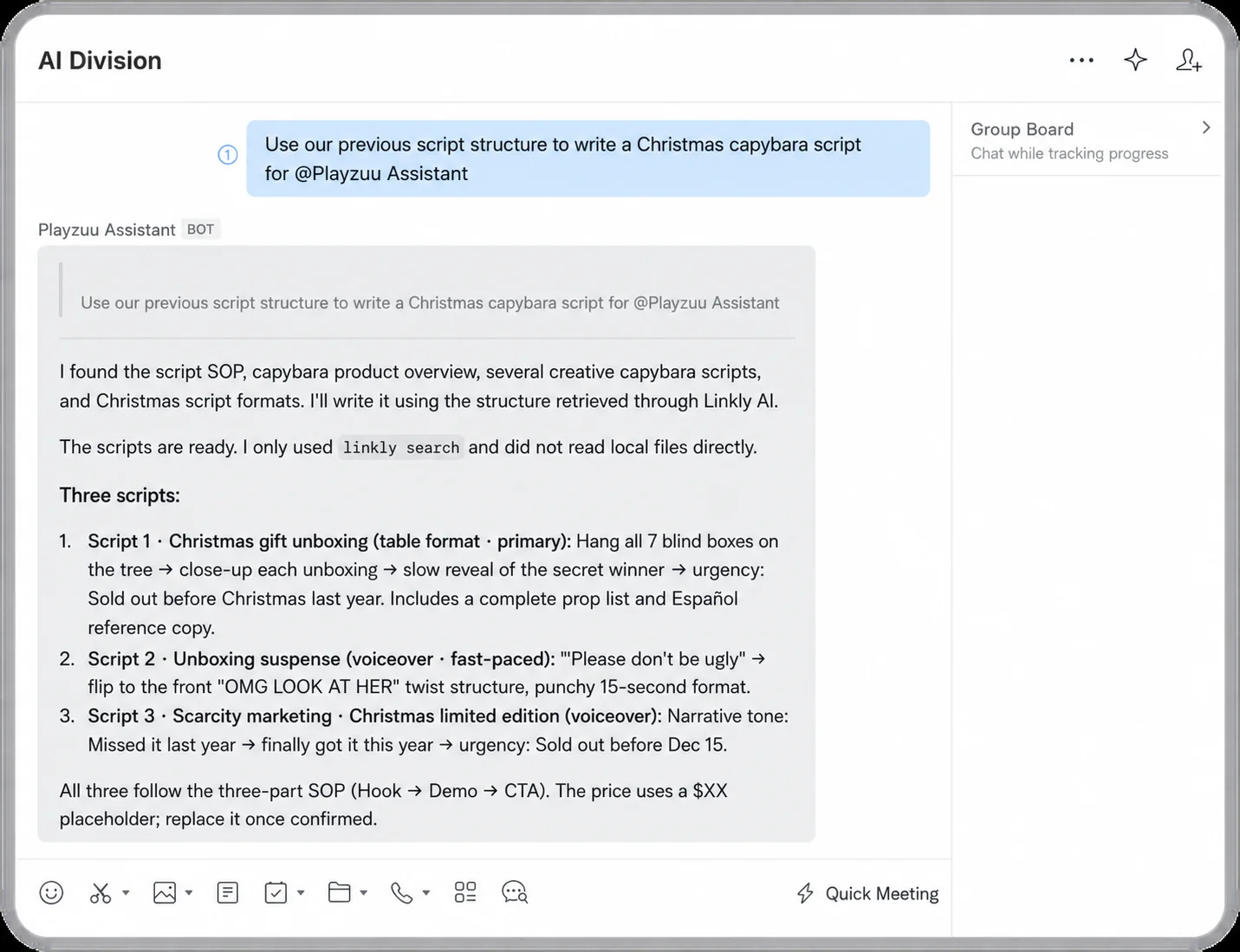
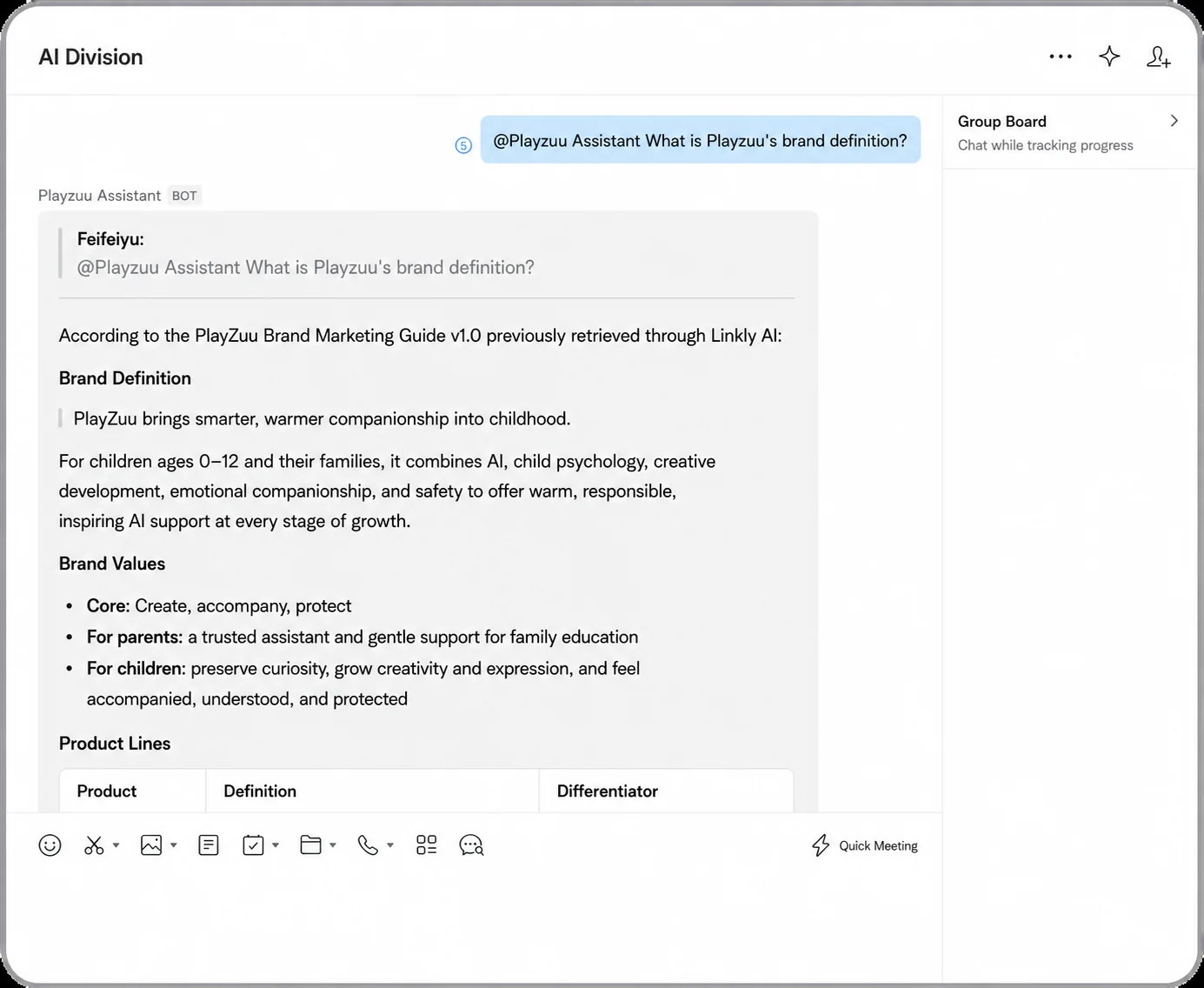
The teammate handles very concrete tasks. When someone asks a product question, it finds the relevant information and answers.
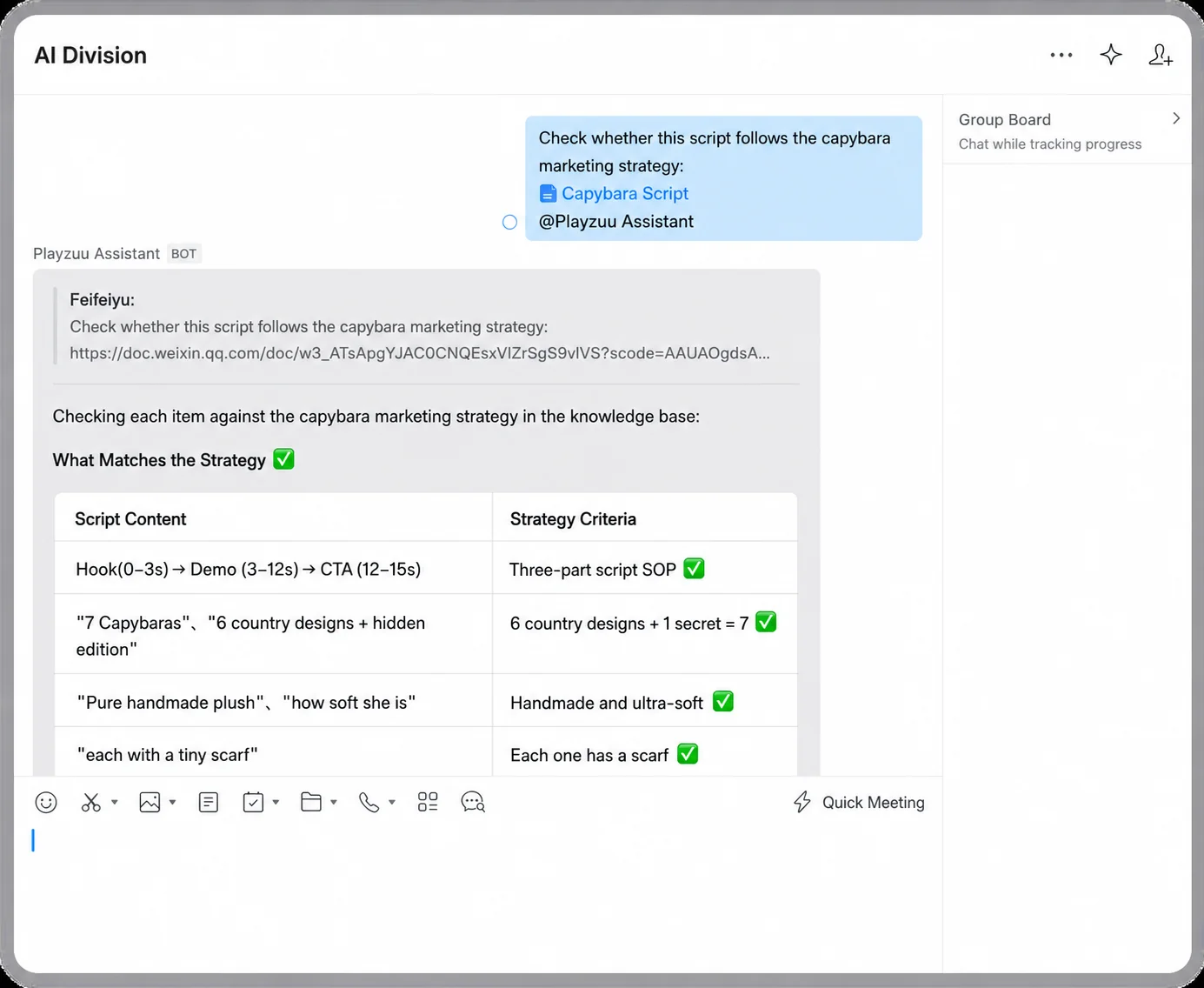
When a marketing draft is ready, the team can also ask it to check the product descriptions before publication.
None of these tasks sounds dramatic on its own. But the workflow was so frictionless that the user felt, for the first time, what changes when a team’s Agents share the same context.
Here is how they built it and what it was like to use in real work.
Part 1: In the Agent Era, Why Are We Still Human APIs?
The same questions appear again and again in our team chats:
- “Does the product support this feature yet?”
- “Can you check the product claims in this draft?”
Most of the answers already exist in the official documentation or the team’s knowledge base. Yet when a question comes up, people still @ the product manager.
Over time, the product manager becomes the company’s human API. The information has been digitized, but the interface everyone actually calls is still a person.
Part 2: Can You Build a Knowledge Bot Without Rebuilding the Knowledge Base?
That led to a simple question: if the answers already exist in our documents, why not ask a knowledge bot directly?
The idea does not sound new. Feed a bot a few product documents and tell it, “You are our product assistant. Answer questions based on these materials.” Done, right?
Once we tried to build it, though, we realized something was missing.
A product manager can answer these questions not because they memorized an FAQ, but because they carry the full context of the work behind it.
In practice, that context does not live in one corporate knowledge base. Product documents, release notes, meeting records, technical files from development, and even analyses produced by other Agents may all matter to the answer.
Much of this material affects decisions long before anyone has time to turn it into formal knowledge-base content.
Around the same time, WorkBuddy opened up its CLI. That suggested another approach: if the product team already has the necessary context, could an Agent read those existing files directly and use them as the bot’s context?
So we tried the full chain: Linkly AI + WorkBuddy + WeCom.
In less than 30 minutes, the “WeCom teammate” was running.
In this setup, Linkly AI connects the scattered documents on the product team’s computers and serves as WorkBuddy’s context layer. WorkBuddy runs the bot.
There is no need to copy everything into a new bot, and the knowledge base is not locked to one particular Agent. Change the model or the workspace, and the same source material remains usable.
Part 3: Build a WeCom AI Teammate in Three Steps
The connection takes three steps.
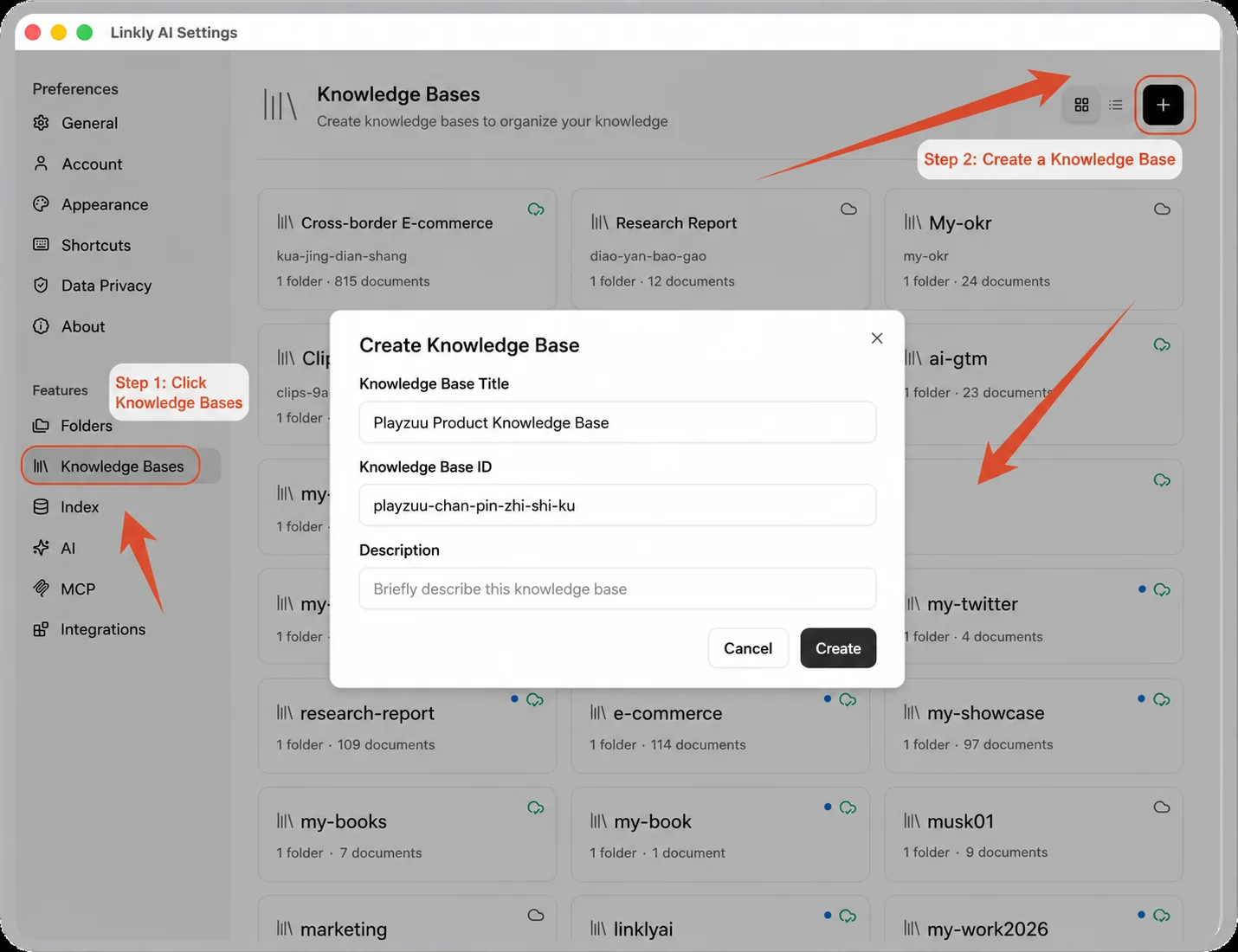
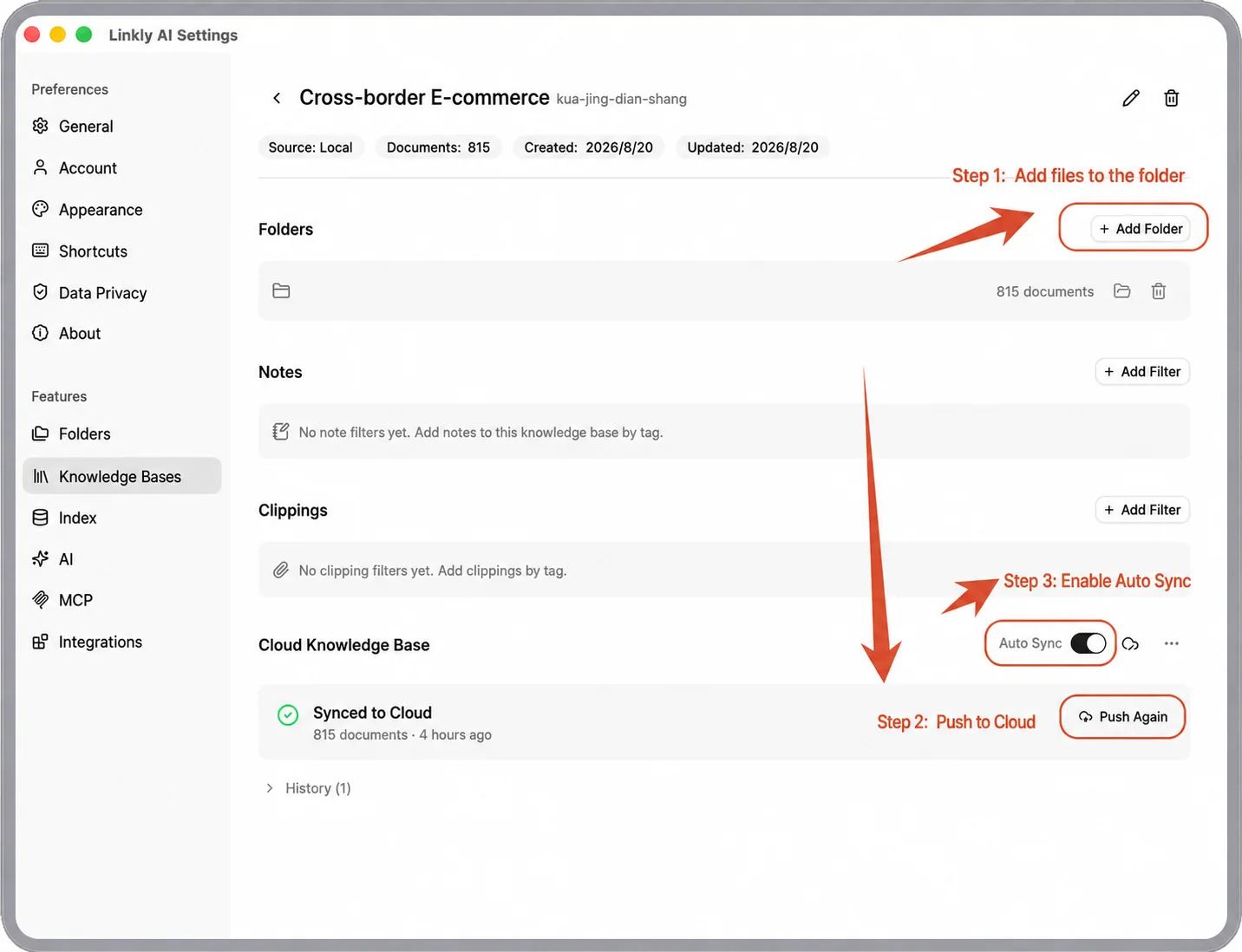
Step 1: Connect Local Documents in Linkly AI
Create a shareable knowledge base and connect the local product materials the team actually uses, such as help documentation, release notes, and product blog posts. Then push the selected library to the cloud so other Agents can use it.
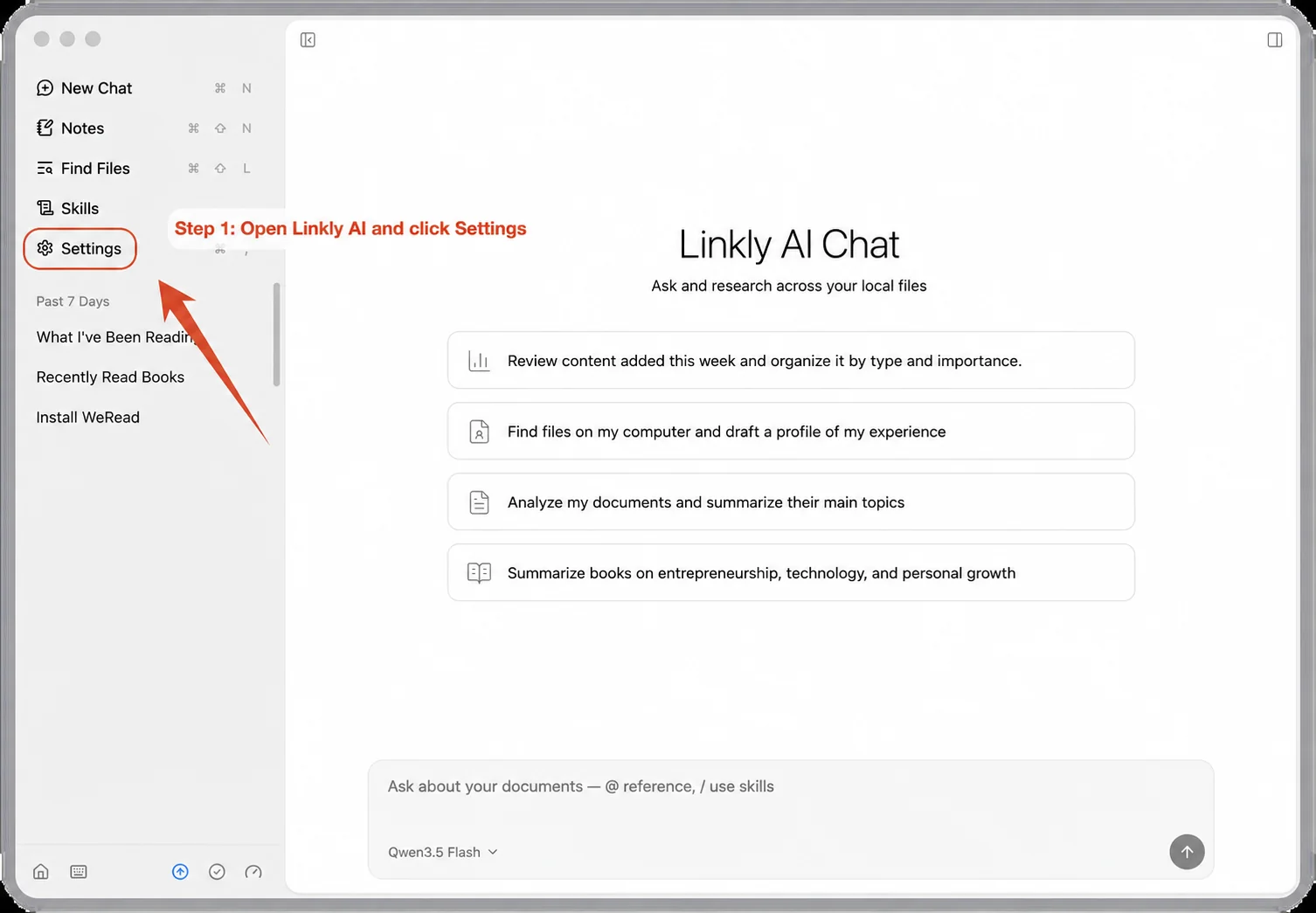
Step 2: Connect Linkly AI to WorkBuddy
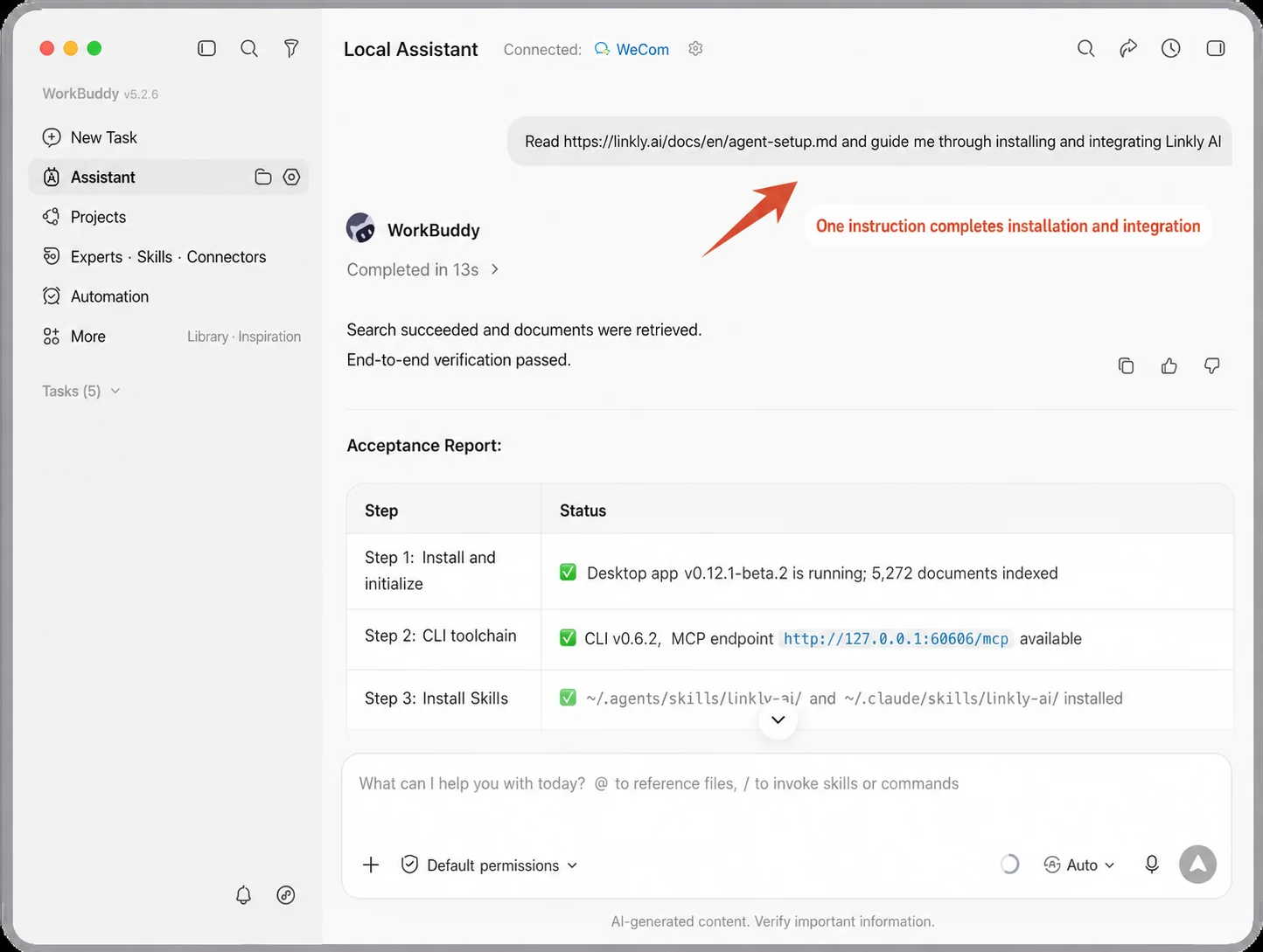
Give WorkBuddy this instruction:
Read
https://linkly.ai/docs/en/agent-setup.md, guide me through installing and integrating Linkly AI, and then test whether WorkBuddy can read the specified cloud knowledge base.
Step 3: Connect WorkBuddy to WeCom
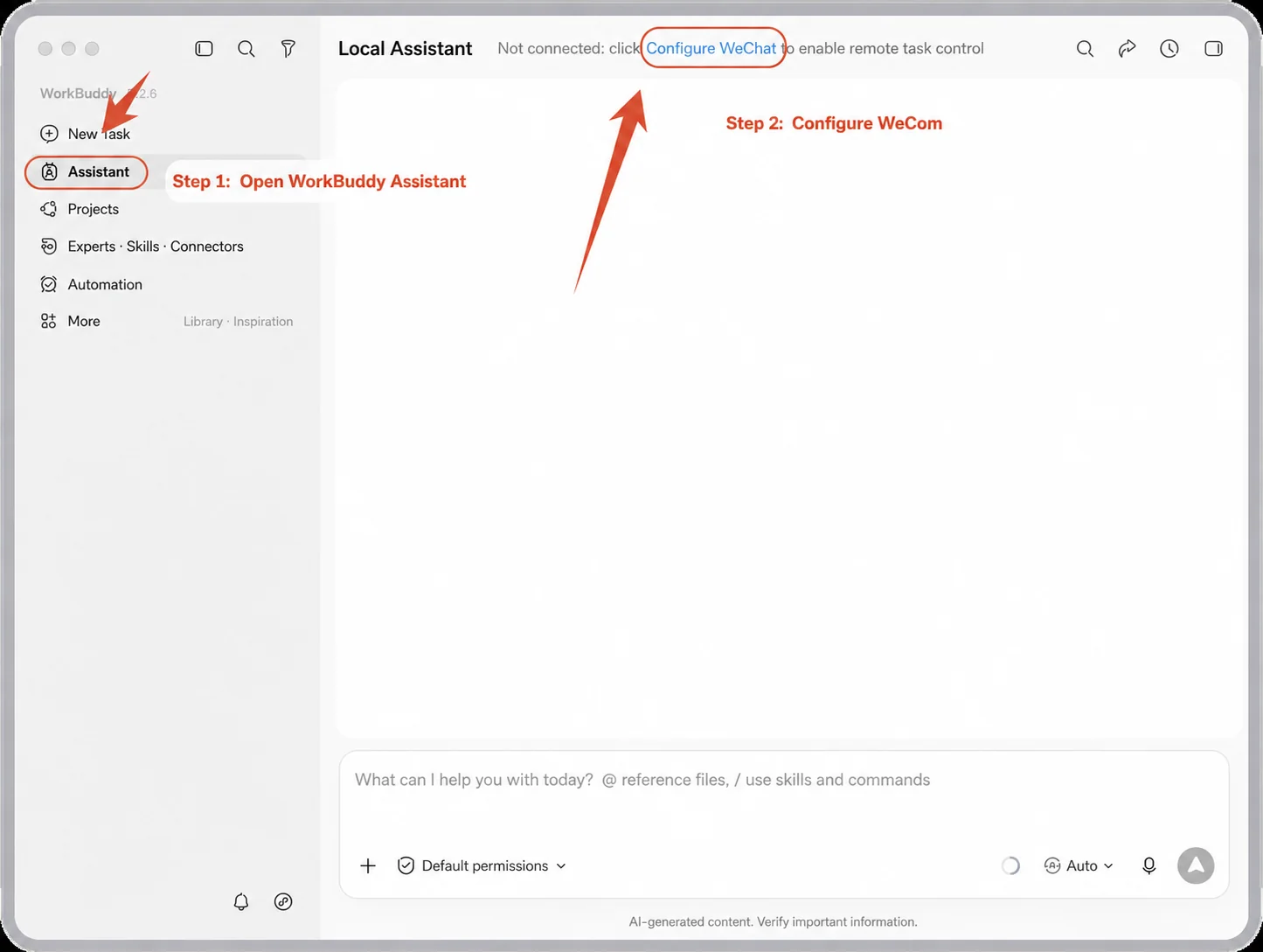
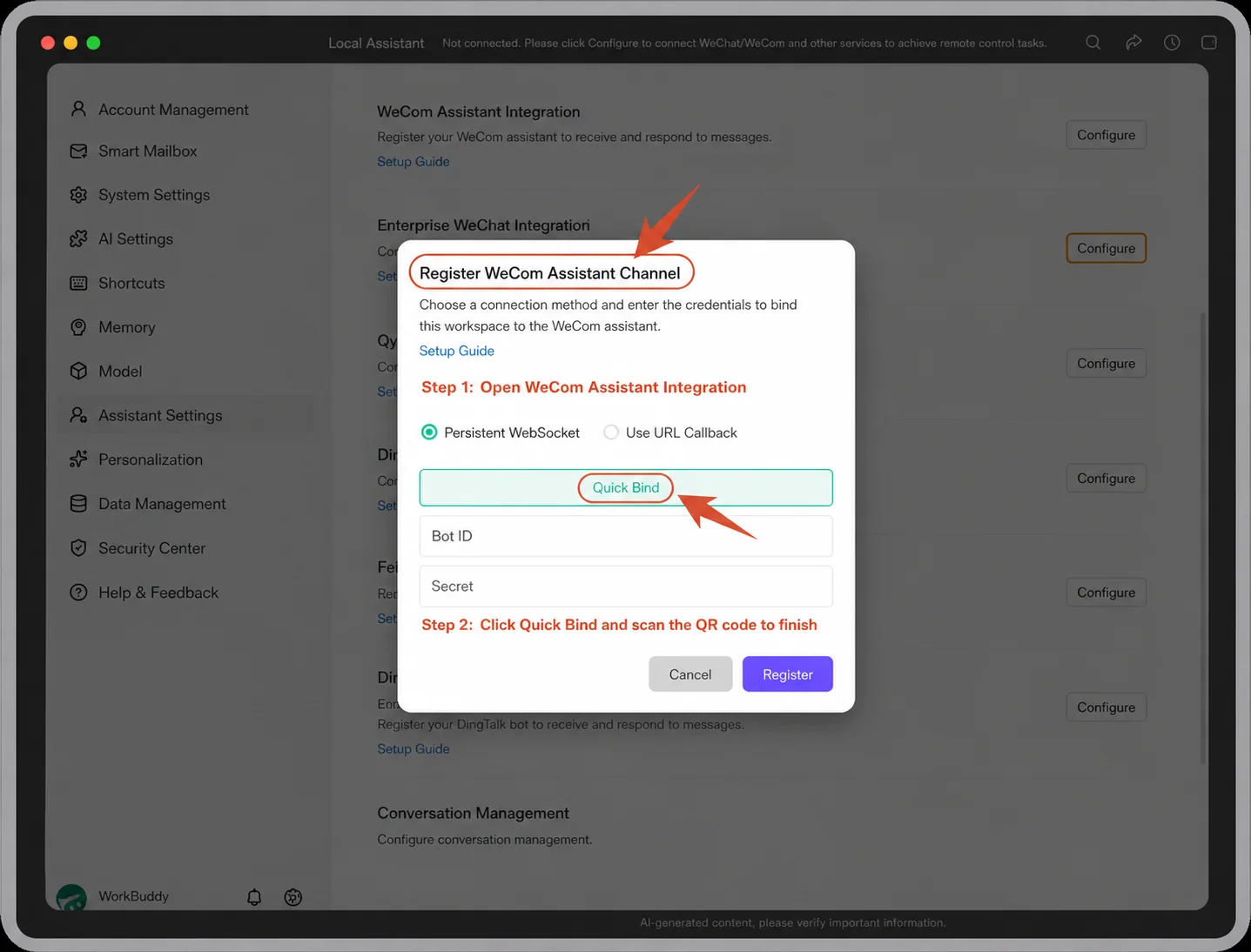
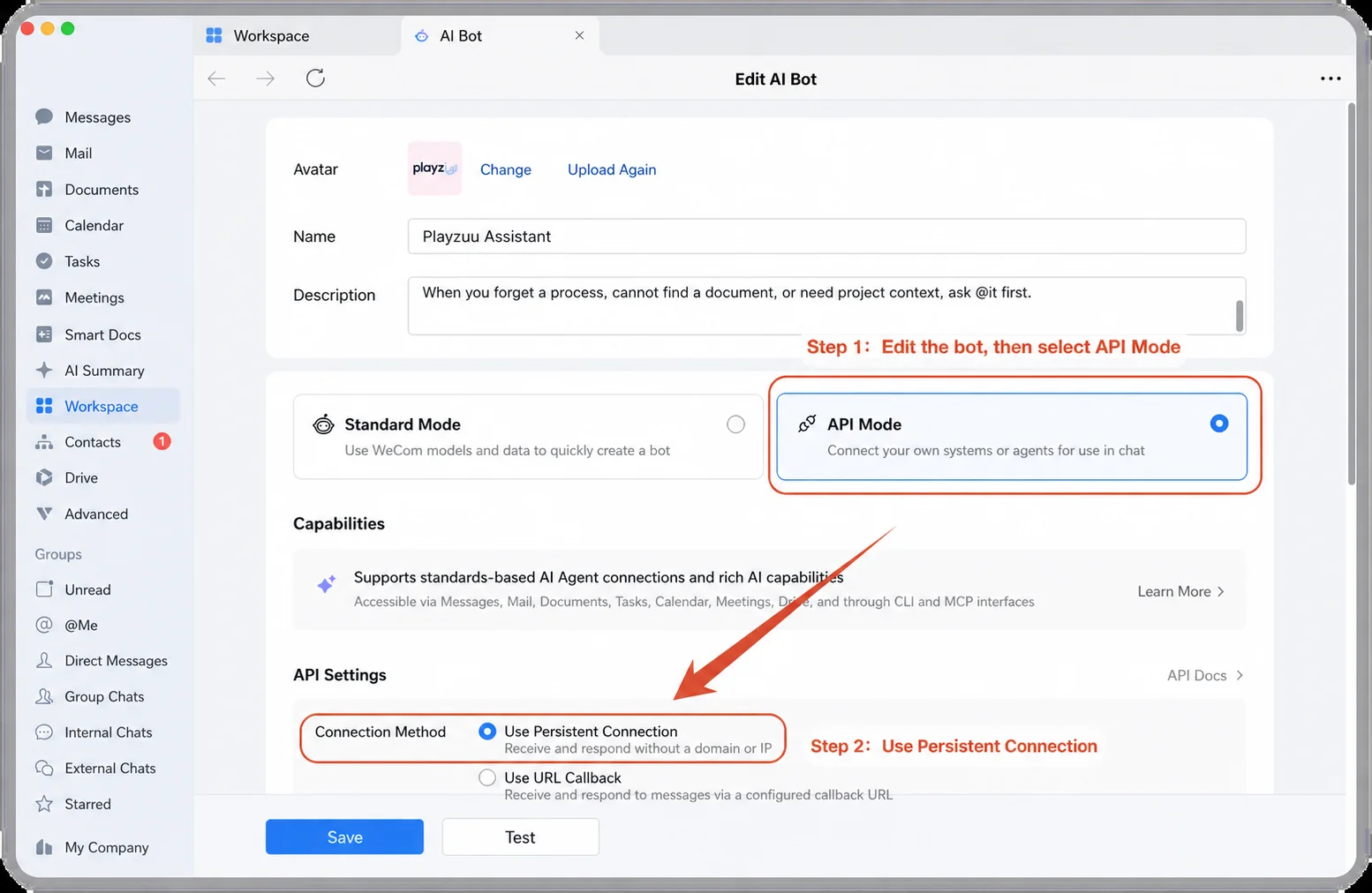
The path is straightforward: open WorkBuddy → Assistant Mode → Assistant Settings → Integrate WeCom → Scan to Sign In → Finish Configuration.
Once the bot is configured, add it to the group. In under 30 minutes from start to finish, the chat has a new product teammate.
Part 4: Why Add Linkly AI?
Knowledge-base bots were already everywhere last year.
If the result were only “ask one product question and get one answer,” this setup would not feel transformative. The moment that changed our minds was reviewing a marketing draft.
A draft was about to be published, and the marketing team needed the product team to verify every feature claim.
The normal workflow would be: marketing finishes the draft → @ product → product checks it line by line → product sends revisions.
This time, marketing sent the full draft to the bot first. The bot checked each product-related statement against the source materials. A product teammate later reviewed the bot’s work and found no issues.
That was the moment we understood how useful a knowledge base becomes when it enters the workflow itself.
At this point, a fair question is: WeCom can already connect to different knowledge sources. Why add Linkly AI as another layer?
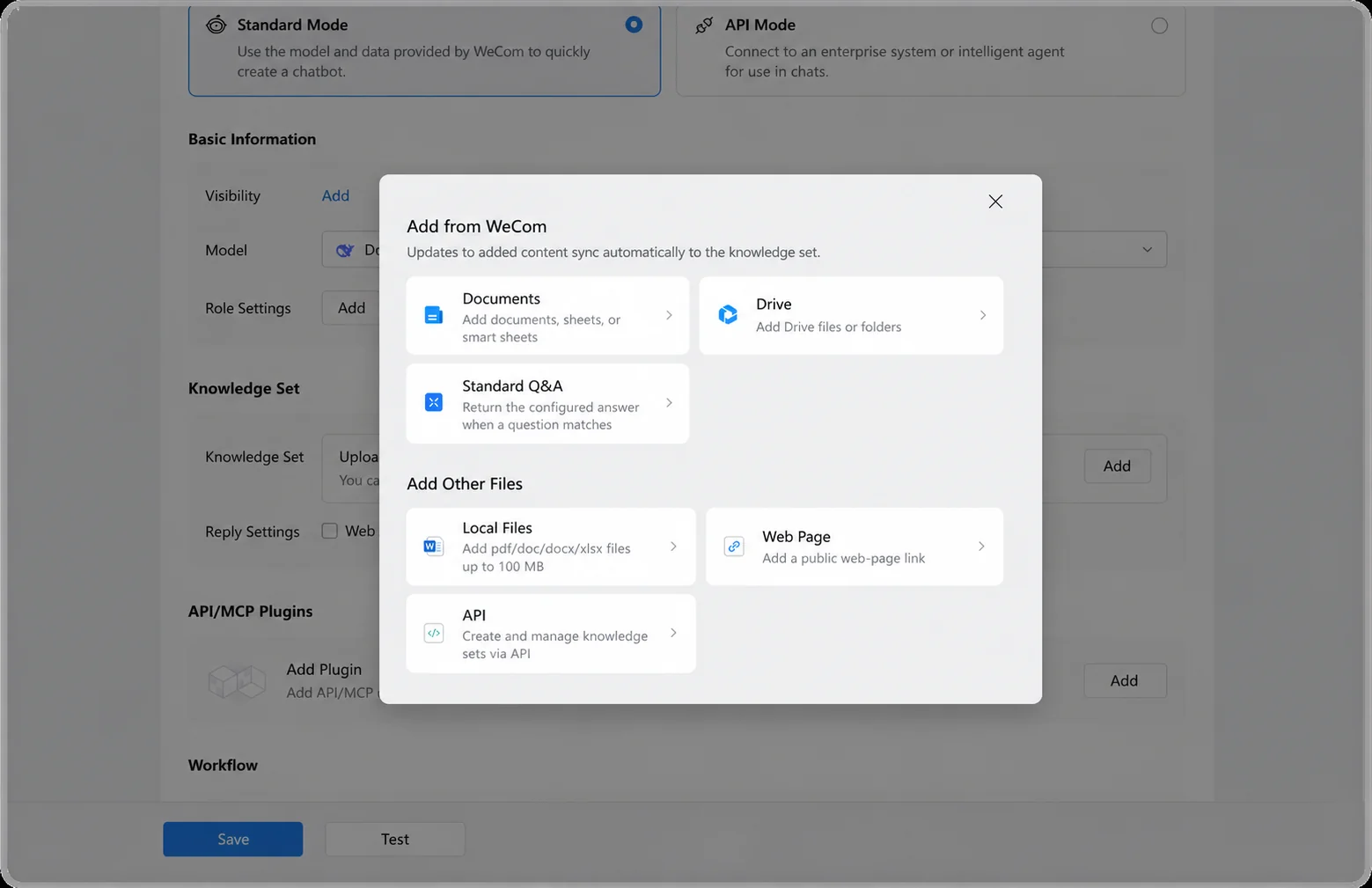
If a team’s materials already live neatly in WeCom Docs and WeCom Drive, and the team only plans to use one or two bots inside WeCom, the built-in knowledge set may be enough. There is no reason to add another system merely for the sake of it.
Our situation was different.
Some product materials lived in GitHub and local project directories. Others were PDFs, slide decks, meeting recordings, or older versions. The marketing team had its own topics, articles, user feedback, and asset library. The files that actively shaped the work far exceeded what had already been organized in WeCom.
The real question became: should we move all of that material again just so the WeCom bot can know about it?
Linkly AI solves two problems in this workflow.
1. Stop Maintaining a Second Copy Just for Agents
WeCom knowledge sets work well for content already maintained in WeCom Docs. When those documents change, the knowledge set can update with them.
But when the team’s source material lives in local folders, GitHub repositories, Obsidian, PDFs, images, audio, or video, it often needs to be uploaded, migrated, or reorganized. The team ends up maintaining two copies:
- the source files used in the real work;
- a separate knowledge-base copy created for the bot.
The Agent was supposed to reduce work, but now it has created another maintenance task.
Linkly AI reduces that duplication. It builds an Agent-readable index map for local folders while the files remain where they are. When the files change, Linkly AI keeps the index current. An Agent can use that map to find the latest information when it needs it.
People still decide which files should be connected. Linkly AI simply removes much of the repetitive uploading, migration, and synchronization work.
2. Give Every Agent the Same Context Layer, Not Just the WeCom Bot
A WeCom knowledge set can provide context to a bot inside WeCom. But teams today rarely use only one Agent. Developers may work with Codex or Claude Code, while marketers use WorkBuddy.
Everyone uploads files and explains the background to their own Agent. Switch to another Agent, and the setup starts over.
When team context is not synchronized, each Agent begins telling a different story. The development Agent has read the latest version, while the marketing Agent is still writing from old material. Eventually, everyone returns to the group chat and asks the one person who knows the product best.
With Linkly AI, every Agent on the team can use the same continuously updated cloud knowledge base.
That creates two immediate benefits:
- less time repeatedly feeding context to different Agents;
- fewer bad Agent decisions caused by inconsistent information.
Part 5: Next Time, Ask the Bot First
The most immediate change from this experiment was simple:
- Marketing can run a first review after finishing a draft instead of waiting for a reply.
- Product teammates can reserve their time for decisions that actually require judgment instead of explaining the same thing again and again.
The next time a similar question comes up, we will ask the bot first. If it cannot find the answer, then we ask a person.
An AI-native team does not have to begin with dozens of Agents holding meetings and making decisions on their own.
It may begin with something much smaller: for the first time, a situation that used to require @-mentioning a person no longer does.