Connect Antigravity to your local documents through MCP or Linkly AI CLI.
Connect Antigravity to your local documents through MCP or Linkly AI CLI.
Before you start
Install Antigravity and keep Linkly AI Desktop running on the same computer. Add a folder and wait for indexing to finish. On the Agent usage page, enable Allow local access and copy the address from View MCP connection settings. The example uses port 60606; use the address shown in your app.
Connect with local MCP
1
Open the configuration
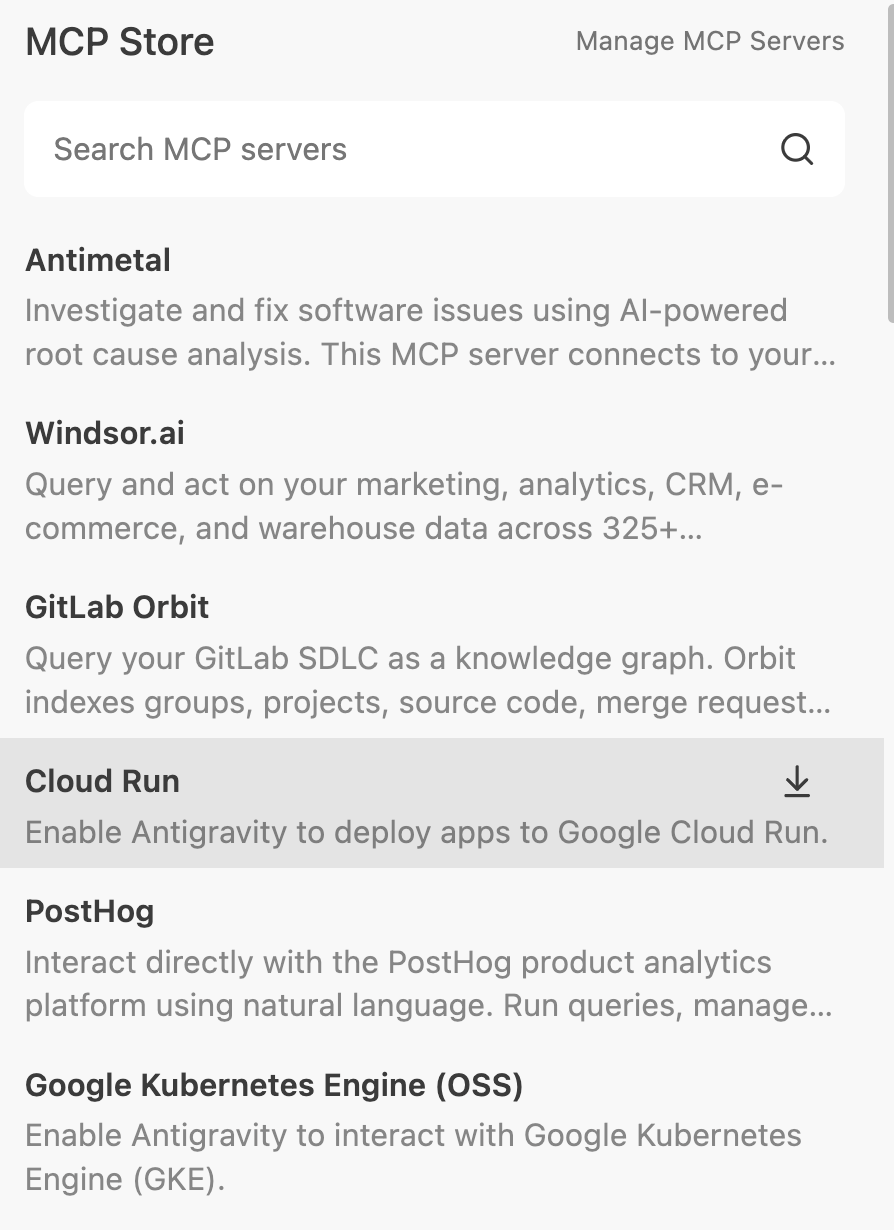
In the Antigravity IDE agent panel, open … → MCP Servers → Manage MCP Servers → View raw config. In Antigravity App, open Customizations → Installed → MCP Servers and use Copy Config File Path to find the configuration.
Official MCP Store screenshot, with the management button at the top right.
Save the file. In the IDE, return to Manage MCP Servers and refresh. In the App, use More actions (⋮) → Restart next to the server. Confirm that linkly-ai and its tools appear.
Other connection methods
MCP stdio
First install Linkly AI CLI, then use this configuration instead of the HTTP entry. Keep Linkly AI Desktop running. If Antigravity cannot find linkly, use the full path to the installed executable as command.
Ask this in a new conversation. Check that Antigravity calls Linkly AI tools and returns indexed documents. If it cannot connect, check that local access is running, the port matches the desktop app, and both apps run on the same computer.
Linkly AI Skills provide instructions for searching and reading documents. For cloud libraries or access from another computer, see the integration overview.
{"docsConfig":{"theme":"aspen","$schema":"https://mintlify.com/docs.json","name":"Linkly AI","description":"Linkly AI indexes the files on your computer so that you and your AI agents can search and read them","colors":{"primary":"#E07A5F","light":"#E07A5F","dark":"#E07A5F"},"logo":{"light":"https://mintcdn.com/linklyai/QRYT8KUi52tlS1kG/logo/light.webp?fit=max\u0026auto=format\u0026n=QRYT8KUi52tlS1kG\u0026q=85\u0026s=da18afd9b2ffdddb03b0b1fe29a40649","dark":"https://mintcdn.com/linklyai/QRYT8KUi52tlS1kG/logo/dark.webp?fit=max\u0026auto=format\u0026n=QRYT8KUi52tlS1kG\u0026q=85\u0026s=c9a234662fe52b9eb211571d3fc9ae3d"},"favicon":{"light":"https://mintcdn.com/linklyai/QRYT8KUi52tlS1kG/favicon.png?fit=max\u0026auto=format\u0026n=QRYT8KUi52tlS1kG\u0026q=85\u0026s=28da236390a9945fa278b6031b8e4034","dark":"https://mintcdn.com/linklyai/QRYT8KUi52tlS1kG/favicon.png?fit=max\u0026auto=format\u0026n=QRYT8KUi52tlS1kG\u0026q=85\u0026s=28da236390a9945fa278b6031b8e4034"},"background":{"color":{"light":"#fafafa","dark":"#1C2433"}},"navbar":{"links":[{"icon":"House","href":"https://linkly.ai","label":"Home"}],"primary":{"type":"button","label":"Download","href":"https://linkly.ai/#get-started"}},"footer":{"socials":{"x":"https://x.com/linkly_ai","github":"https://github.com/LinklyAI","youtube":"https://www.youtube.com/@LinklyAI","reddit":"https://www.reddit.com/r/linklyai"}},"integrations":{"posthog":{"apiKey":"phc_EPUWAudMJflgv4Ow1MEMfntL4GEYVT4RfZj2rDkQdLn","apiHost":"https://us.i.posthog.com"}},"contextual":{"options":["copy","view","chatgpt","claude"],"display":"header"},"styling":{"latex":false},"navigation":{"languages":[{"language":"en","href":"en/introduction"},{"language":"zh","href":"zh/introduction"},{"language":"ja","href":"ja/introduction"},{"language":"fr","href":"fr/introduction"},{"language":"es","href":"es/introduction"},{"language":"ru","href":"ru/introduction"}]}},"deployment":{"deploymentMetadataValue":{"subdomain":"linklyai","hasAudioNarration":false,"actualSubdomain":"linklyai","customDomains":["linkly.ai"],"gitSource":{"type":"github","owner":"linklyai","repo":"linkly-ai-docs","deployBranch":"main","contentDirectory":"","isPrivate":true,"mountPath":"","label":""},"feedback":{"thumbs":true},"entitlements":{},"buildId":"6b05205df993858644df069d","clientVersion":"0.0.4286","searchFilterCounts":[{"language":"en","tag":"Integrations","count":24},{"language":"zh","tag":"集成","count":24},{"language":"en","tag":"Guides","count":22},{"language":"es","tag":"Guías","count":22},{"language":"es","tag":"Integraciones","count":22},{"language":"fr","tag":"Guides","count":22},{"language":"fr","tag":"Intégrations","count":22},{"language":"ja","tag":"ガイド","count":22},{"language":"ja","tag":"インテグレーション","count":22},{"language":"ru","tag":"Руководства","count":22},{"language":"ru","tag":"Интеграции","count":22},{"language":"zh","tag":"指南","count":22},{"language":"en","tag":"Core Features","count":11},{"language":"es","tag":"Funciones principales","count":11},{"language":"fr","tag":"Fonctionnalités principales","count":11},{"language":"ja","tag":"主な機能","count":11},{"language":"ru","tag":"Основные функции","count":11},{"language":"zh","tag":"核心功能","count":11},{"language":"en","tag":"Coding AI Agents","count":9},{"language":"en","tag":"AI Assistants","count":9},{"language":"es","tag":"Agentes IA de codificación","count":9},{"language":"es","tag":"Asistentes IA","count":9},{"language":"fr","tag":"Agents IA de codage","count":9},{"language":"fr","tag":"Assistants IA","count":9},{"language":"ja","tag":"コーディングAIエージェント","count":9},{"language":"ja","tag":"AIアシスタント","count":9},{"language":"ru","tag":"Агенты программирования","count":9},{"language":"ru","tag":"ИИ-помощники","count":9},{"language":"zh","tag":"编程 AI 代理","count":9},{"language":"zh","tag":"AI 助手","count":9},{"language":"zh","tag":"使用案例","count":6},{"language":"en","tag":"Connect Your AI Tools","count":5},{"language":"en","tag":"Use Cases","count":5},{"language":"es","tag":"Conecta tus herramientas de IA","count":5},{"language":"fr","tag":"Connecter vos outils IA","count":5},{"language":"ja","tag":"AI ツールと連携","count":5},{"language":"ru","tag":"Подключение ИИ-инструментов","count":5},{"language":"zh","tag":"接入 AI 工具","count":5},{"language":"en","tag":"Getting Started","count":4},{"language":"es","tag":"Inicio rápido","count":4},{"language":"es","tag":"Casos de uso","count":4},{"language":"fr","tag":"Démarrage rapide","count":4},{"language":"fr","tag":"Cas d'utilisation","count":4},{"language":"ja","tag":"はじめに","count":4},{"language":"ja","tag":"活用事例","count":4},{"language":"ru","tag":"Начало работы","count":4},{"language":"ru","tag":"Сценарии","count":4},{"language":"zh","tag":"快速开始","count":4},{"language":"en","tag":"Changelog","count":3},{"language":"es","tag":"Registro de cambios","count":3},{"language":"fr","tag":"Journal des modifications","count":3},{"language":"ja","tag":"更新履歴","count":3},{"language":"ru","tag":"Журнал изменений","count":3},{"language":"en","tag":"For AI Agents","count":2},{"language":"es","tag":"Para Agentes de IA","count":2},{"language":"fr","tag":"Pour les Agents IA","count":2},{"language":"ja","tag":"AI Agent 向け","count":2},{"language":"ru","tag":"Для ИИ-агентов","count":2},{"language":"zh","tag":"给 Agent 的指南","count":2},{"language":"zh","tag":"更新日志","count":2}],"searchSettings":{"showContentSnippets":false}},"assistantConfig":{},"basePath":"/docs","hasChatPermissions":false,"hasWebMcpPermissions":false,"toggles":[{"name":"kill-isr","enabled":true,"variant":{"name":"disabled","enabled":false,"feature_enabled":true},"impressionData":false},{"name":"custom-rbac-roles","enabled":true,"variant":{"name":"disabled","enabled":false,"feature_enabled":true},"impressionData":false},{"name":"agent-mintlify-slack","enabled":true,"variant":{"name":"disabled","enabled":false,"feature_enabled":true},"impressionData":false},{"name":"agent-integrations-settings","enabled":true,"variant":{"name":"disabled","enabled":false,"feature_enabled":true},"impressionData":false},{"name":"rbac-expansion","enabled":true,"variant":{"name":"disabled","enabled":false,"feature_enabled":true},"impressionData":false},{"name":"automations-pr-grouping","enabled":true,"variant":{"name":"disabled","enabled":false,"feature_enabled":true},"impressionData":false},{"name":"custom-prefix","enabled":true,"variant":{"name":"disabled","enabled":false,"feature_enabled":true},"impressionData":false},{"name":"analytics-v7","enabled":true,"variant":{"name":"disabled","enabled":false,"feature_enabled":true},"impressionData":false},{"name":"user-flows-analytics","enabled":true,"variant":{"name":"disabled","enabled":false,"feature_enabled":true},"impressionData":false},{"name":"no-publish-flow","enabled":true,"variant":{"name":"disabled","enabled":false,"feature_enabled":true},"impressionData":false},{"name":"workos-onboarding","enabled":true,"variant":{"name":"disabled","enabled":false,"feature_enabled":true},"impressionData":false},{"name":"snapshot-serving-live","enabled":true,"variant":{"name":"disabled","enabled":false,"feature_enabled":true},"impressionData":false},{"name":"stripTemperatureMiddleware","enabled":true,"variant":{"name":"disabled","enabled":false,"feature_enabled":true},"impressionData":false},{"name":"support-platform-pylon-zendesk","enabled":true,"variant":{"name":"disabled","enabled":false,"feature_enabled":true},"impressionData":false},{"name":"snapshot-serving","enabled":true,"variant":{"name":"disabled","enabled":false,"feature_enabled":true},"impressionData":false},{"name":"instant-rollback","enabled":true,"variant":{"name":"disabled","enabled":false,"feature_enabled":true},"impressionData":false},{"name":"granular-notifications-server","enabled":true,"variant":{"name":"disabled","enabled":false,"feature_enabled":true},"impressionData":false},{"name":"granular-notifications","enabled":true,"variant":{"name":"disabled","enabled":false,"feature_enabled":true},"impressionData":false},{"name":"automations-fable","enabled":true,"variant":{"name":"disabled","enabled":false,"feature_enabled":true},"impressionData":false},{"name":"fixed-ai-action-pricing","enabled":true,"variant":{"name":"disabled","enabled":false,"feature_enabled":true},"impressionData":false},{"name":"site-roles","enabled":true,"variant":{"name":"disabled","enabled":false,"feature_enabled":true},"impressionData":false},{"name":"automation-resolve-merge-conflict","enabled":true,"variant":{"name":"disabled","enabled":false,"feature_enabled":true},"impressionData":false},{"name":"scoped-publishing","enabled":true,"variant":{"name":"disabled","enabled":false,"feature_enabled":true},"impressionData":false},{"name":"mintql","enabled":true,"variant":{"name":"disabled","enabled":false,"feature_enabled":true},"impressionData":false},{"name":"page-level-analytics","enabled":true,"variant":{"name":"disabled","enabled":false,"feature_enabled":true},"impressionData":false},{"name":"editor-version-history-v2","enabled":true,"variant":{"name":"disabled","enabled":false,"feature_enabled":true},"impressionData":false},{"name":"billing-page-v2","enabled":true,"variant":{"name":"disabled","enabled":false,"feature_enabled":true},"impressionData":false},{"name":"full-page-search","enabled":true,"variant":{"name":"disabled","enabled":false,"feature_enabled":true},"impressionData":false},{"name":"workspace-projects","enabled":true,"variant":{"name":"disabled","enabled":false,"feature_enabled":true},"impressionData":false},{"name":"assistant-v5","enabled":true,"variant":{"name":"disabled","enabled":false,"feature_enabled":true},"impressionData":false},{"name":"fork-pr-previews","enabled":true,"variant":{"name":"disabled","enabled":false,"feature_enabled":true},"impressionData":false},{"name":"revalidation-jwt","enabled":true,"variant":{"name":"disabled","enabled":false,"feature_enabled":true},"impressionData":false},{"name":"workos-sso-scim","enabled":true,"variant":{"name":"disabled","enabled":false,"feature_enabled":true},"impressionData":false},{"name":"hobby-abuse-scan","enabled":true,"variant":{"name":"disabled","enabled":false,"feature_enabled":true},"impressionData":false},{"name":"dashboard-inbox","enabled":true,"variant":{"name":"disabled","enabled":false,"feature_enabled":true},"impressionData":false},{"name":"workos-signup","enabled":true,"variant":{"name":"disabled","enabled":false,"feature_enabled":true},"impressionData":false},{"name":"turbopuffer-dual-write","enabled":true,"variant":{"name":"disabled","enabled":false,"feature_enabled":true},"impressionData":false},{"name":"workos-enabled","enabled":true,"variant":{"name":"disabled","enabled":false,"feature_enabled":true},"impressionData":false},{"name":"approve-review-flow","enabled":true,"variant":{"name":"disabled","enabled":false,"feature_enabled":true},"impressionData":false},{"name":"editor-metadata","enabled":true,"variant":{"name":"disabled","enabled":false,"feature_enabled":true},"impressionData":false},{"name":"sso-setup-deadline-banner","enabled":true,"variant":{"name":"disabled","enabled":false,"feature_enabled":true},"impressionData":false},{"name":"turbopuffer-serve","enabled":true,"variant":{"name":"disabled","enabled":false,"feature_enabled":true},"impressionData":false},{"name":"live-agents","enabled":true,"variant":{"name":"disabled","enabled":false,"feature_enabled":true},"impressionData":false},{"name":"starter-pricing","enabled":true,"variant":{"name":"treatment","enabled":true,"payload":{"type":"string","value":"treatment"},"feature_enabled":true},"impressionData":false},{"name":"llms-txt-v2","enabled":true,"variant":{"name":"disabled","enabled":false,"feature_enabled":true},"impressionData":false},{"name":"wildcard-email-auth","enabled":true,"variant":{"name":"disabled","enabled":false,"feature_enabled":true},"impressionData":false}],"googleFontsInlined":false},"customCss":[{"filePath":"style.css","content":"::-webkit-scrollbar{width:8px;height:8px}::-webkit-scrollbar-track{background:transparent}::-webkit-scrollbar-thumb{background:rgba(0, 0, 0, 0.2);border-radius:4px}::-webkit-scrollbar-thumb:hover{background:rgba(0, 0, 0, 0.3)}.dark ::-webkit-scrollbar-thumb{background:rgba(255, 255, 255, 0.2)}.dark ::-webkit-scrollbar-thumb:hover{background:rgba(255, 255, 255, 0.3)}*{scrollbar-width:thin;scrollbar-color:rgba(0, 0, 0, 0.2) transparent}.dark *{scrollbar-color:rgba(255, 255, 255, 0.2) transparent}"}]}
{"page":{"pagePath":"en/integration/use-in-antigravity","slug":"/en/integration/use-in-antigravity","pageMetadata":{"title":"Using Linkly AI in Antigravity","description":"Connect Antigravity to your local documents through MCP or Linkly AI CLI.","sidebarTitle":"Antigravity","keywords":["Linkly AI","Antigravity","Google Antigravity","MCP","CLI"],"href":"/en/integration/use-in-antigravity"},"description":{"compiledSource":"\"use strict\";\nconst {jsx: _jsx} = arguments[0];\nconst {useMDXComponents: _provideComponents} = arguments[0];\nfunction _createMdxContent(props) {\n const _components = {\n p: \"p\",\n ..._provideComponents(),\n ...props.components\n };\n return _jsx(_components.p, {\n children: \"Connect Antigravity to your local documents through MCP or Linkly AI CLI.\"\n });\n}\nfunction MDXContent(props = {}) {\n const {wrapper: MDXLayout} = {\n ..._provideComponents(),\n ...props.components\n };\n return MDXLayout ? _jsx(MDXLayout, {\n ...props,\n children: _jsx(_createMdxContent, {\n ...props\n })\n }) : _createMdxContent(props);\n}\nreturn {\n default: MDXContent\n};\n","frontmatter":{},"scope":{}},"pageType":"default","mdx":{"mdxSource":{"compiledSource":"\"use strict\";const{Fragment:_Fragment,jsx:_jsx,jsxs:_jsxs}=arguments[0];const{useMDXComponents:_provideComponents}=arguments[0];function _createMdxContent(props){const _components={a:`a`,code:`code`,p:`p`,pre:`pre`,span:`span`,strong:`strong`,..._provideComponents(),...props.components},{CodeBlock,Frame,Heading,OptimizedImage,Prompt,Step,Steps,Tip}=_components;if(!CodeBlock)_missingMdxReference(`CodeBlock`,true);if(!Frame)_missingMdxReference(`Frame`,true);if(!Heading)_missingMdxReference(`Heading`,true);if(!OptimizedImage)_missingMdxReference(`OptimizedImage`,true);if(!Prompt)_missingMdxReference(`Prompt`,true);if(!Step)_missingMdxReference(`Step`,true);if(!Steps)_missingMdxReference(`Steps`,true);if(!Tip)_missingMdxReference(`Tip`,true);return _jsxs(_Fragment,{children:[_jsx(_components.p,{children:`Connect Antigravity to your local documents through MCP or Linkly AI CLI.`}),`\n`,_jsx(Heading,{level:`2`,id:`before-you-start`,children:`Before you start`}),`\n`,_jsxs(_components.p,{children:[`Install Antigravity and keep Linkly AI Desktop running on the same computer. Add a folder and wait for indexing to finish. On the `,_jsx(_components.strong,{children:`Agent usage`}),` page, enable `,_jsx(_components.strong,{children:`Allow local access`}),` and copy the address from `,_jsx(_components.strong,{children:`View MCP connection settings`}),`. The example uses port `,_jsx(_components.code,{children:`60606`}),`; use the address shown in your app.`]}),`\n`,_jsx(Heading,{level:`2`,id:`connect-with-local-mcp`,children:`Connect with local MCP`}),`\n`,_jsxs(Steps,{children:[_jsxs(Step,{title:`Open the configuration`,children:[_jsxs(_components.p,{children:[`In the Antigravity IDE agent panel, open `,_jsx(_components.strong,{children:`… → MCP Servers → Manage MCP Servers → View raw config`}),`. In Antigravity App, open `,_jsx(_components.strong,{children:`Customizations → Installed → MCP Servers`}),` and use `,_jsx(_components.strong,{children:`Copy Config File Path`}),` to find the configuration.`]}),_jsx(Frame,{caption:`Official MCP Store screenshot, with the management button at the top right.`,children:_jsx(OptimizedImage,{src:`https://mintcdn.com/linklyai/mVKF7iMXAI5wxq17/images/antigravity-mcp-servers.png?fit=max\u0026auto=format\u0026n=mVKF7iMXAI5wxq17\u0026q=85\u0026s=504166e9fa8dc5cf62e8f2a9008a6a51`,alt:`Official MCP Store screenshot, with the management button at the top right.`,\"data-og-width\":`894`,width:`894`,\"data-og-height\":`1230`,height:`1230`,\"data-path\":`images/antigravity-mcp-servers.png`,\"data-optimize\":`true`,\"data-opv\":`3`,srcset:`https://mintcdn.com/linklyai/mVKF7iMXAI5wxq17/images/antigravity-mcp-servers.png?w=280\u0026fit=max\u0026auto=format\u0026n=mVKF7iMXAI5wxq17\u0026q=85\u0026s=d108d50f7446e7af846bbf9d2eec61e8 280w, https://mintcdn.com/linklyai/mVKF7iMXAI5wxq17/images/antigravity-mcp-servers.png?w=560\u0026fit=max\u0026auto=format\u0026n=mVKF7iMXAI5wxq17\u0026q=85\u0026s=3524057dc2e8350a48a3330a858cceb0 560w, https://mintcdn.com/linklyai/mVKF7iMXAI5wxq17/images/antigravity-mcp-servers.png?w=840\u0026fit=max\u0026auto=format\u0026n=mVKF7iMXAI5wxq17\u0026q=85\u0026s=ca2d5609abaaf051fc26810787449636 840w, https://mintcdn.com/linklyai/mVKF7iMXAI5wxq17/images/antigravity-mcp-servers.png?w=1100\u0026fit=max\u0026auto=format\u0026n=mVKF7iMXAI5wxq17\u0026q=85\u0026s=9f0c2ba76d92c3a7f31b062d9443e81e 1100w, https://mintcdn.com/linklyai/mVKF7iMXAI5wxq17/images/antigravity-mcp-servers.png?w=1650\u0026fit=max\u0026auto=format\u0026n=mVKF7iMXAI5wxq17\u0026q=85\u0026s=964e975006e045b11f927c692482a659 1650w, https://mintcdn.com/linklyai/mVKF7iMXAI5wxq17/images/antigravity-mcp-servers.png?w=2500\u0026fit=max\u0026auto=format\u0026n=mVKF7iMXAI5wxq17\u0026q=85\u0026s=1f356b7933cc999c219f8f97b7d211e8 2500w`})}),_jsxs(_components.p,{children:[`Source: Google Codelabs. Unmodified. `,_jsx(_components.a,{href:`https://codelabs.developers.google.com/getting-started-agy-ide#9`,children:`Getting Started with Antigravity IDE`}),` · `,_jsx(_components.a,{href:`https://creativecommons.org/licenses/by/4.0/`,children:`CC BY 4.0`})]})]}),_jsxs(Step,{title:`Add the server`,children:[_jsxs(_components.p,{children:[`Add this entry to `,_jsx(_components.code,{children:`mcpServers`}),` in `,_jsx(_components.code,{children:`mcp_config.json`}),`, keeping your other server entries. Local HTTP access does not need an API key.`]}),_jsx(CodeBlock,{filename:``,numberOfLines:`7`,language:`json`,children:_jsx(_components.pre,{className:`shiki shiki-themes github-light-default dark-plus`,style:{backgroundColor:`#ffffff`,\"--shiki-dark-bg\":`#0B0C0E`,color:`#1f2328`,\"--shiki-dark\":`#D4D4D4`},language:`json`,children:_jsxs(_components.code,{language:`json`,numberOfLines:`7`,children:[_jsx(_components.span,{className:`line`,children:_jsx(_components.span,{style:{color:`#1F2328`,\"--shiki-dark\":`#D4D4D4`},children:`{`})}),`\n`,_jsxs(_components.span,{className:`line`,children:[_jsx(_components.span,{style:{color:`#116329`,\"--shiki-dark\":`#9CDCFE`},children:` \"mcpServers\"`}),_jsx(_components.span,{style:{color:`#1F2328`,\"--shiki-dark\":`#D4D4D4`},children:`: {`})]}),`\n`,_jsxs(_components.span,{className:`line`,children:[_jsx(_components.span,{style:{color:`#116329`,\"--shiki-dark\":`#9CDCFE`},children:` \"linkly-ai\"`}),_jsx(_components.span,{style:{color:`#1F2328`,\"--shiki-dark\":`#D4D4D4`},children:`: {`})]}),`\n`,_jsxs(_components.span,{className:`line`,children:[_jsx(_components.span,{style:{color:`#116329`,\"--shiki-dark\":`#9CDCFE`},children:` \"serverUrl\"`}),_jsx(_components.span,{style:{color:`#1F2328`,\"--shiki-dark\":`#D4D4D4`},children:`: `}),_jsx(_components.span,{style:{color:`#0A3069`,\"--shiki-dark\":`#CE9178`},children:`\"http://127.0.0.1:60606/mcp\"`})]}),`\n`,_jsx(_components.span,{className:`line`,children:_jsx(_components.span,{style:{color:`#1F2328`,\"--shiki-dark\":`#D4D4D4`},children:` }`})}),`\n`,_jsx(_components.span,{className:`line`,children:_jsx(_components.span,{style:{color:`#1F2328`,\"--shiki-dark\":`#D4D4D4`},children:` }`})}),`\n`,_jsx(_components.span,{className:`line`,children:_jsx(_components.span,{style:{color:`#1F2328`,\"--shiki-dark\":`#D4D4D4`},children:`}`})}),`\n`]})})})]}),_jsx(Step,{title:`Save and refresh`,children:_jsxs(_components.p,{children:[`Save the file. In the IDE, return to `,_jsx(_components.strong,{children:`Manage MCP Servers`}),` and refresh. In the App, use `,_jsx(_components.strong,{children:`More actions (⋮) → Restart`}),` next to the server. Confirm that `,_jsx(_components.code,{children:`linkly-ai`}),` and its tools appear.`]})})]}),`\n`,_jsx(Heading,{level:`2`,id:`other-connection-methods`,children:`Other connection methods`}),`\n`,_jsx(Heading,{level:`3`,id:`mcp-stdio`,children:`MCP stdio`}),`\n`,_jsxs(_components.p,{children:[`First `,_jsx(_components.a,{href:`/en/use-cli`,children:`install Linkly AI CLI`}),`, then use this configuration instead of the HTTP entry. Keep Linkly AI Desktop running. If Antigravity cannot find `,_jsx(_components.code,{children:`linkly`}),`, use the full path to the installed executable as `,_jsx(_components.code,{children:`command`}),`.`]}),`\n`,_jsx(CodeBlock,{filename:``,numberOfLines:`10`,language:`json`,children:_jsx(_components.pre,{className:`shiki shiki-themes github-light-default dark-plus`,style:{backgroundColor:`#ffffff`,\"--shiki-dark-bg\":`#0B0C0E`,color:`#1f2328`,\"--shiki-dark\":`#D4D4D4`},language:`json`,children:_jsxs(_components.code,{language:`json`,numberOfLines:`10`,children:[_jsx(_components.span,{className:`line`,children:_jsx(_components.span,{style:{color:`#1F2328`,\"--shiki-dark\":`#D4D4D4`},children:`{`})}),`\n`,_jsxs(_components.span,{className:`line`,children:[_jsx(_components.span,{style:{color:`#116329`,\"--shiki-dark\":`#9CDCFE`},children:` \"mcpServers\"`}),_jsx(_components.span,{style:{color:`#1F2328`,\"--shiki-dark\":`#D4D4D4`},children:`: {`})]}),`\n`,_jsxs(_components.span,{className:`line`,children:[_jsx(_components.span,{style:{color:`#116329`,\"--shiki-dark\":`#9CDCFE`},children:` \"linkly-ai\"`}),_jsx(_components.span,{style:{color:`#1F2328`,\"--shiki-dark\":`#D4D4D4`},children:`: {`})]}),`\n`,_jsxs(_components.span,{className:`line`,children:[_jsx(_components.span,{style:{color:`#116329`,\"--shiki-dark\":`#9CDCFE`},children:` \"command\"`}),_jsx(_components.span,{style:{color:`#1F2328`,\"--shiki-dark\":`#D4D4D4`},children:`: `}),_jsx(_components.span,{style:{color:`#0A3069`,\"--shiki-dark\":`#CE9178`},children:`\"linkly\"`}),_jsx(_components.span,{style:{color:`#1F2328`,\"--shiki-dark\":`#D4D4D4`},children:`,`})]}),`\n`,_jsxs(_components.span,{className:`line`,children:[_jsx(_components.span,{style:{color:`#116329`,\"--shiki-dark\":`#9CDCFE`},children:` \"args\"`}),_jsx(_components.span,{style:{color:`#1F2328`,\"--shiki-dark\":`#D4D4D4`},children:`: [`})]}),`\n`,_jsx(_components.span,{className:`line`,children:_jsx(_components.span,{style:{color:`#0A3069`,\"--shiki-dark\":`#CE9178`},children:` \"mcp\"`})}),`\n`,_jsx(_components.span,{className:`line`,children:_jsx(_components.span,{style:{color:`#1F2328`,\"--shiki-dark\":`#D4D4D4`},children:` ]`})}),`\n`,_jsx(_components.span,{className:`line`,children:_jsx(_components.span,{style:{color:`#1F2328`,\"--shiki-dark\":`#D4D4D4`},children:` }`})}),`\n`,_jsx(_components.span,{className:`line`,children:_jsx(_components.span,{style:{color:`#1F2328`,\"--shiki-dark\":`#D4D4D4`},children:` }`})}),`\n`,_jsx(_components.span,{className:`line`,children:_jsx(_components.span,{style:{color:`#1F2328`,\"--shiki-dark\":`#D4D4D4`},children:`}`})}),`\n`]})})}),`\n`,_jsx(Heading,{level:`3`,id:`cli`,children:`CLI`}),`\n`,_jsx(_components.p,{children:`After installing the CLI, you can also ask the agent to run these commands directly:`}),`\n`,_jsx(CodeBlock,{filename:``,numberOfLines:`2`,language:`shellscript`,children:_jsx(_components.pre,{className:`shiki shiki-themes github-light-default dark-plus`,style:{backgroundColor:`#ffffff`,\"--shiki-dark-bg\":`#0B0C0E`,color:`#1f2328`,\"--shiki-dark\":`#D4D4D4`},language:`shellscript`,children:_jsxs(_components.code,{language:`shellscript`,numberOfLines:`2`,children:[_jsxs(_components.span,{className:`line`,children:[_jsx(_components.span,{style:{color:`#953800`,\"--shiki-dark\":`#DCDCAA`},children:`linkly`}),_jsx(_components.span,{style:{color:`#0A3069`,\"--shiki-dark\":`#CE9178`},children:` search`}),_jsx(_components.span,{style:{color:`#0A3069`,\"--shiki-dark\":`#CE9178`},children:` \"project requirements\"`})]}),`\n`,_jsxs(_components.span,{className:`line`,children:[_jsx(_components.span,{style:{color:`#953800`,\"--shiki-dark\":`#DCDCAA`},children:`linkly`}),_jsx(_components.span,{style:{color:`#0A3069`,\"--shiki-dark\":`#CE9178`},children:` read`}),_jsx(_components.span,{style:{color:`#CF222E`,\"--shiki-dark\":`#D4D4D4`},children:` \u003c`}),_jsx(_components.span,{style:{color:`#0A3069`,\"--shiki-dark\":`#CE9178`},children:`document-i`}),_jsx(_components.span,{style:{color:`#0A3069`,\"--shiki-dark\":`#CE9178`},children:`d`}),_jsx(_components.span,{style:{color:`#CF222E`,\"--shiki-dark\":`#D4D4D4`},children:`>`})]}),`\n`]})})}),`\n`,_jsx(Heading,{level:`2`,id:`verify-the-connection`,children:`Verify the connection`}),`\n`,_jsx(Prompt,{children:`Search my documents for project requirements and read one relevant result.`}),`\n`,_jsx(_components.p,{children:`Ask this in a new conversation. Check that Antigravity calls Linkly AI tools and returns indexed documents. If it cannot connect, check that local access is running, the port matches the desktop app, and both apps run on the same computer.`}),`\n`,_jsxs(Tip,{children:[_jsx(_components.a,{href:`/en/use-skills`,children:`Linkly AI Skills`}),` provide instructions for searching and reading documents. For cloud libraries or access from another computer, see the `,_jsx(_components.a,{href:`/en/integration`,children:`integration overview`}),`.`]}),`\n`,_jsx(Heading,{level:`2`,id:`official-reference`,children:`Official reference`}),`\n`,_jsx(_components.p,{children:_jsx(_components.a,{href:`https://antigravity.google/docs/mcp`,children:`Antigravity MCP`})})]})}function MDXContent(props={}){const{wrapper:MDXLayout}={..._provideComponents(),...props.components};return MDXLayout?_jsx(MDXLayout,{...props,children:_jsx(_createMdxContent,{...props})}):_createMdxContent(props)}return{default:MDXContent};function _missingMdxReference(id,component){throw new Error(`Expected `+(component?`component`:`object`)+\" `\"+id+\"` to be defined: you likely forgot to import, pass, or provide it.\")}","frontmatter":{},"scope":{"config":{},"pageMetadata":{"title":"Using Linkly AI in Antigravity","description":"Connect Antigravity to your local documents through MCP or Linkly AI CLI.","sidebarTitle":"Antigravity","keywords":["Linkly AI","Antigravity","Google Antigravity","MCP","CLI"],"href":"/en/integration/use-in-antigravity"}}},"mdxSourceWithNoJs":null},"mdxExtracts":{"tableOfContents":[{"title":"Before you start","slug":"before-you-start","depth":2,"children":[]},{"title":"Connect with local MCP","slug":"connect-with-local-mcp","depth":2,"children":[]},{"title":"Other connection methods","slug":"other-connection-methods","depth":2,"children":[{"title":"MCP stdio","slug":"mcp-stdio","depth":3,"children":[]},{"title":"CLI","slug":"cli","depth":3,"children":[]}]},{"title":"Verify the connection","slug":"verify-the-connection","depth":2,"children":[]},{"title":"Official reference","slug":"official-reference","depth":2,"children":[]}],"codeExamples":{}},"jsLinks":[],"subdomain":"linklyai","siteName":"Linkly AI","title":"Using Linkly AI in Antigravity - Linkly AI","navMaps":{"firstHrefInVersion":{},"firstHrefInLanguage":{"en":{"href":"/en/integration/use-in-antigravity","matchLevel":0},"zh":{"href":"/zh/integration/use-in-antigravity","matchLevel":1},"ja":{"href":"/ja/integration/use-in-antigravity","matchLevel":1},"fr":{"href":"/fr/integration/use-in-antigravity","matchLevel":1},"es":{"href":"/es/integration/use-in-antigravity","matchLevel":1},"ru":{"href":"/ru/integration/use-in-antigravity","matchLevel":1}}},"lastModified":"2026-11-24T05:28:01.307Z","originalFileLocation":"en/integration/use-in-antigravity.mdx","locale":"en"},"headHtml":"\u003cscript data-mint-head>(function(){var d=document.documentElement,p=null;if(!p){try{p=localStorage.getItem(\"isDarkMode\")}catch(e){}if(p==='true')p='dark';else if(p==='false')p='light';if(p!=='light'\u0026\u0026p!=='dark'\u0026\u0026p!=='system')p=\"system\"}var r=p==='system'?(matchMedia(\"(prefers-color-scheme: dark)\").matches?'dark':'light'):p;d.classList.remove(r==='dark'?'light':'dark');d.classList.add(r);d.setAttribute(\"data-theme-preference\",p)})();\u003c/script>\u003cmeta data-mint-head name=\"description\" content=\"Connect Antigravity to your local documents through MCP or Linkly AI CLI.\">\u003cmeta data-mint-head name=\"application-name\" content=\"Linkly AI\">\u003cmeta data-mint-head name=\"generator\" content=\"Mintlify\">\u003clink data-mint-head rel=\"icon\" type=\"image/png\" sizes=\"192x192\" href=\"/docs/mintlify-assets/_mintlify/favicons/linklyai/qwc1AXICytsNXWWd/_generated/favicon/android-chrome-192x192.png\" media=\"(prefers-color-scheme: light)\">\u003clink data-mint-head rel=\"apple-touch-icon\" type=\"image/png\" sizes=\"180x180\" href=\"/docs/mintlify-assets/_mintlify/favicons/linklyai/qwc1AXICytsNXWWd/_generated/favicon/apple-touch-icon.png\">\u003clink data-mint-head rel=\"icon\" type=\"image/png\" sizes=\"16x16\" href=\"/docs/mintlify-assets/_mintlify/favicons/linklyai/qwc1AXICytsNXWWd/_generated/favicon/favicon-16x16.png\" media=\"(prefers-color-scheme: light)\">\u003clink data-mint-head rel=\"icon\" type=\"image/png\" sizes=\"32x32\" href=\"/docs/mintlify-assets/_mintlify/favicons/linklyai/qwc1AXICytsNXWWd/_generated/favicon/favicon-32x32.png\" media=\"(prefers-color-scheme: light)\">\u003clink data-mint-head rel=\"shortcut icon\" type=\"image/x-icon\" href=\"/docs/mintlify-assets/_mintlify/favicons/linklyai/qwc1AXICytsNXWWd/_generated/favicon/favicon.ico\" media=\"(prefers-color-scheme: light)\">\u003clink data-mint-head rel=\"icon\" type=\"image/png\" sizes=\"192x192\" href=\"/docs/mintlify-assets/_mintlify/favicons/linklyai/qwc1AXICytsNXWWd/_generated/favicon-dark/android-chrome-192x192.png\" media=\"(prefers-color-scheme: dark)\">\u003clink data-mint-head rel=\"icon\" type=\"image/png\" sizes=\"16x16\" href=\"/docs/mintlify-assets/_mintlify/favicons/linklyai/qwc1AXICytsNXWWd/_generated/favicon-dark/favicon-16x16.png\" media=\"(prefers-color-scheme: dark)\">\u003clink data-mint-head rel=\"icon\" type=\"image/png\" sizes=\"32x32\" href=\"/docs/mintlify-assets/_mintlify/favicons/linklyai/qwc1AXICytsNXWWd/_generated/favicon-dark/favicon-32x32.png\" media=\"(prefers-color-scheme: dark)\">\u003clink data-mint-head rel=\"shortcut icon\" type=\"image/x-icon\" href=\"/docs/mintlify-assets/_mintlify/favicons/linklyai/qwc1AXICytsNXWWd/_generated/favicon-dark/favicon.ico\" media=\"(prefers-color-scheme: dark)\">\u003cmeta data-mint-head property=\"og:title\" content=\"Using Linkly AI in Antigravity - Linkly AI\">\u003cmeta data-mint-head property=\"og:description\" content=\"Connect Antigravity to your local documents through MCP or Linkly AI CLI.\">\u003cmeta data-mint-head property=\"og:site_name\" content=\"Linkly AI\">\u003cmeta data-mint-head property=\"og:url\" content=\"https://linkly.ai/docs/en/integration/use-in-antigravity\">\u003cmeta data-mint-head property=\"og:type\" content=\"website\">\u003cmeta data-mint-head property=\"og:image\" content=\"https://linklyai.mintlify.site/docs/_mintlify/api/og/v2?division=Coding+AI+Agents\u0026amp;title=Using+Linkly+AI+in+Antigravity\u0026amp;description=Connect+Antigravity+to+your+local+documents+through+MCP+or+Linkly+AI+CLI.\u0026amp;theme=0e7eec6f179798f71d3d88fb\u0026amp;signature=8a3f40b5a111da1b4b92b22bfb6308012f16d2a0286b423e9175befc445c9711\">\u003cmeta data-mint-head property=\"og:image:width\" content=\"1200\">\u003cmeta data-mint-head property=\"og:image:height\" content=\"630\">\u003cmeta data-mint-head name=\"twitter:card\" content=\"summary_large_image\">\u003cmeta data-mint-head name=\"twitter:title\" content=\"Using Linkly AI in Antigravity - Linkly AI\">\u003cmeta data-mint-head name=\"twitter:description\" content=\"Connect Antigravity to your local documents through MCP or Linkly AI CLI.\">\u003cmeta data-mint-head name=\"twitter:image\" content=\"https://linklyai.mintlify.site/docs/_mintlify/api/og/v2?division=Coding+AI+Agents\u0026amp;title=Using+Linkly+AI+in+Antigravity\u0026amp;description=Connect+Antigravity+to+your+local+documents+through+MCP+or+Linkly+AI+CLI.\u0026amp;theme=0e7eec6f179798f71d3d88fb\u0026amp;signature=8a3f40b5a111da1b4b92b22bfb6308012f16d2a0286b423e9175befc445c9711\">\u003cmeta data-mint-head name=\"twitter:image:width\" content=\"1200\">\u003cmeta data-mint-head name=\"twitter:image:height\" content=\"630\">\u003cmeta data-mint-head name=\"msapplication-config\" content=\"/docs/mintlify-assets/_mintlify/favicons/linklyai/qwc1AXICytsNXWWd/_generated/favicon/browserconfig.xml\">\u003cmeta data-mint-head name=\"apple-mobile-web-app-title\" content=\"Linkly AI\">\u003cmeta data-mint-head name=\"msapplication-TileColor\" content=\"#E07A5F\">\u003clink data-mint-head rel=\"canonical\" href=\"https://linkly.ai/docs/en/integration/use-in-antigravity\">\u003clink data-mint-head rel=\"alternate\" type=\"application/xml\" href=\"/docs/sitemap.xml\">\u003clink data-mint-head rel=\"alternate\" type=\"text/markdown\" href=\"/docs/en/integration/use-in-antigravity.md\">\u003clink data-mint-head rel=\"alternate\" hreflang=\"en\" href=\"https://linkly.ai/docs/en/integration/use-in-antigravity\">\u003clink data-mint-head rel=\"alternate\" hreflang=\"zh\" href=\"https://linkly.ai/docs/zh/integration/use-in-antigravity\">\u003clink data-mint-head rel=\"alternate\" hreflang=\"ja\" href=\"https://linkly.ai/docs/ja/integration/use-in-antigravity\">\u003clink data-mint-head rel=\"alternate\" hreflang=\"fr\" href=\"https://linkly.ai/docs/fr/integration/use-in-antigravity\">\u003clink data-mint-head rel=\"alternate\" hreflang=\"es\" href=\"https://linkly.ai/docs/es/integration/use-in-antigravity\">\u003clink data-mint-head rel=\"alternate\" hreflang=\"ru\" href=\"https://linkly.ai/docs/ru/integration/use-in-antigravity\">\u003clink data-mint-head rel=\"alternate\" hreflang=\"x-default\" href=\"https://linkly.ai/docs/en/integration/use-in-antigravity\">\u003cscript data-mint-head type=\"application/ld+json\">{\"@context\":\"https://schema.org\",\"@graph\":[{\"@type\":\"Organization\",\"@id\":\"https://linkly.ai/#organization\",\"name\":\"Linkly AI\",\"url\":\"https://linkly.ai\",\"logo\":{\"@type\":\"ImageObject\",\"url\":\"https://mintcdn.com/linklyai/QRYT8KUi52tlS1kG/logo/light.webp?fit=max\u0026auto=format\u0026n=QRYT8KUi52tlS1kG\u0026q=85\u0026s=da18afd9b2ffdddb03b0b1fe29a40649\"}},{\"@type\":\"WebSite\",\"@id\":\"https://linkly.ai/docs#website\",\"name\":\"Linkly AI\",\"url\":\"https://linkly.ai/docs\",\"publisher\":{\"@id\":\"https://linkly.ai/#organization\"}},{\"@type\":\"WebPage\",\"@id\":\"https://linkly.ai/docs/en/integration/use-in-antigravity#webpage\",\"url\":\"https://linkly.ai/docs/en/integration/use-in-antigravity\",\"name\":\"Using Linkly AI in Antigravity\",\"description\":\"Connect Antigravity to your local documents through MCP or Linkly AI CLI.\",\"dateModified\":\"2026-11-24T05:28:01.307Z\",\"isPartOf\":{\"@id\":\"https://linkly.ai/docs#website\"},\"breadcrumb\":{\"@id\":\"https://linkly.ai/docs/en/integration/use-in-antigravity#breadcrumb\"}},{\"@type\":\"BreadcrumbList\",\"@id\":\"https://linkly.ai/docs/en/integration/use-in-antigravity#breadcrumb\",\"itemListElement\":[{\"@type\":\"ListItem\",\"position\":1,\"name\":\"Linkly AI\",\"item\":\"https://linkly.ai/docs\"},{\"@type\":\"ListItem\",\"position\":2,\"name\":\"Using Linkly AI in Antigravity\",\"item\":\"https://linkly.ai/docs/en/integration/use-in-antigravity\"}]},{\"@type\":[\"Article\",\"TechArticle\"],\"@id\":\"https://linkly.ai/docs/en/integration/use-in-antigravity#article\",\"headline\":\"Using Linkly AI in Antigravity\",\"name\":\"Using Linkly AI in Antigravity\",\"description\":\"Connect Antigravity to your local documents through MCP or Linkly AI CLI.\",\"url\":\"https://linkly.ai/docs/en/integration/use-in-antigravity\",\"mainEntityOfPage\":{\"@id\":\"https://linkly.ai/docs/en/integration/use-in-antigravity#webpage\"},\"dateModified\":\"2026-11-24T05:28:01.307Z\",\"keywords\":\"Linkly AI, Antigravity, Google Antigravity, MCP, CLI\",\"publisher\":{\"@id\":\"https://linkly.ai/#organization\"},\"isPartOf\":{\"@id\":\"https://linkly.ai/docs#website\"}}]}\u003c/script>\u003cscript data-mint-head type=\"application/ld+json\">{\"@context\":\"https://schema.org\",\"@type\":\"WebSite\",\"name\":\"Linkly AI\",\"publisher\":{\"@type\":\"Organization\",\"name\":\"Linkly AI\"},\"provider\":{\"@type\":\"Organization\",\"name\":\"Mintlify\",\"url\":\"https://mintlify.com\"}}\u003c/script>","agentPointerHref":"/docs/en/integration/use-in-antigravity.md","siteName":"Linkly AI","nav":{"global":null,"languages":[{"language":"en","tabs":[{"tab":"Guides","icon":"book-open-lines","pages":[{"title":"Guides","href":"/en/introduction"}]},{"tab":"Integrations","icon":"puzzle-piece","pages":[{"title":"Integration Overview","sidebarTitle":"Integration Overview","href":"/en/integration"},{"group":"AI Assistants","icon":"sparkles","pages":[{"title":"Using Linkly AI in Claude","sidebarTitle":"Claude","href":"/en/integration/use-in-claude"},{"title":"Using Linkly AI in Claude Cowork","sidebarTitle":"Claude Cowork","href":"/en/integration/use-in-cowork"},{"title":"Using Linkly AI in ChatGPT","sidebarTitle":"ChatGPT","href":"/en/integration/use-in-chatgpt"},{"title":"Using Linkly AI in OpenClaw","sidebarTitle":"OpenClaw","href":"/en/integration/use-in-openclaw"},{"title":"Cherry Studio Knowledge Base: Search Local Files with MCP","sidebarTitle":"Cherry Studio","href":"/en/integration/use-in-cherry-studio"},{"title":"Using Linkly AI in Raycast","sidebarTitle":"Raycast AI","href":"/en/integration/use-in-raycast"},{"title":"Using Linkly AI in QwenPaw","sidebarTitle":"QwenPaw","href":"/en/integration/use-in-qwenpaw"},{"title":"Connect WorkBuddy to Your Local Files with MCP","sidebarTitle":"WorkBuddy","href":"/en/integration/use-in-workbuddy"},{"title":"QoderWork MCP Connector: Search Your Local Files","description":"Add Linkly AI as a connector in QoderWork so it can search and read the documents on your computer.","sidebarTitle":"QoderWork","href":"/en/integration/use-in-qoderwork"}]},{"group":"Coding AI Agents","icon":"code","pages":[{"title":"Using Linkly AI in Antigravity","sidebarTitle":"Antigravity","href":"/en/integration/use-in-antigravity"},{"title":"Cursor MCP: Search Your Documents and Notes","description":"Add Linkly AI to Cursor over MCP so the agent can search and read the documents on your computer.","sidebarTitle":"Cursor","href":"/en/integration/use-in-cursor"},{"title":"Using Linkly AI in Devin Desktop","sidebarTitle":"Devin Desktop","href":"/en/integration/use-in-windsurf"},{"title":"Using Linkly AI in GitHub Copilot","sidebarTitle":"GitHub Copilot","href":"/en/integration/use-in-github-copilot"},{"title":"Codex MCP: Search Your Documents and Notes","sidebarTitle":"Codex","href":"/en/integration/use-in-codex"},{"title":"Claude Code MCP: Search Your Documents and Notes","sidebarTitle":"Claude Code","href":"/en/integration/use-in-claude-code"},{"title":"Using Linkly AI in Gemini CLI","sidebarTitle":"Gemini CLI","href":"/en/integration/use-in-gemini-cli"},{"title":"Using Linkly AI in ZCode","sidebarTitle":"ZCode","href":"/en/integration/use-in-zcode"},{"title":"Kimi Code MCP Setup: Let Kimi Search Your Local Files","sidebarTitle":"Kimi Code","href":"/en/integration/use-in-kimi-code"}]},{"group":"AI Workflows","icon":"robot","pages":[{"title":"Using Linkly AI in n8n","sidebarTitle":"n8n","href":"/en/integration/use-in-n8n"},{"title":"Using Linkly AI in Dify","sidebarTitle":"Dify","href":"/en/integration/use-in-dify"}]},{"group":"Notes and Papers","icon":"book","pages":[{"title":"Search an Obsidian Vault from Claude, Codex and Other Agents","sidebarTitle":"Obsidian","href":"/en/integration/use-with-obsidian"},{"title":"Search Your Zotero Library from Claude and Other Agents","sidebarTitle":"Zotero","href":"/en/integration/use-with-zotero"}]},{"group":"Other","icon":"ellipsis","pages":[{"title":"LM Studio RAG: Chat with Local Documents over MCP","sidebarTitle":"LM Studio","href":"/en/integration/use-in-lm-studio"}]}]},{"tab":"Use Cases","icon":"lightbulb","pages":[{"title":"Use Cases","href":"/en/use-cases/overview"}]},{"tab":"Community","icon":"users","pages":[{"title":"Community","href":"/en/community"}]},{"tab":"Changelog","icon":"clock","pages":[{"title":"Changelog","href":"/en/changelog"}]}],"global":{"anchors":[{"anchor":"Download","icon":"download","href":"https://linkly.ai/#get-started"},{"anchor":"Linkly AI Skills","icon":"gear","href":"https://github.com/LinklyAI/linkly-ai-skills"},{"anchor":"Linkly AI CLI","icon":"terminal","href":"https://github.com/LinklyAI/linkly-ai-cli"}]}},{"language":"zh","pages":[{"title":"zh","href":"/zh/integration/use-in-antigravity"}]},{"language":"ja","pages":[{"title":"ja","href":"/ja/integration/use-in-antigravity"}]},{"language":"fr","pages":[{"title":"fr","href":"/fr/integration/use-in-antigravity"}]},{"language":"es","pages":[{"title":"es","href":"/es/integration/use-in-antigravity"}]},{"language":"ru","pages":[{"title":"ru","href":"/ru/integration/use-in-antigravity"}]}]},"basePath":"","title":"Using Linkly AI in Antigravity - Linkly AI","deploymentId":"dpl_3DZuqjnfdjREuPshghHhyiLeMG3U","buildId":"dpl_3DZuqjnfdjREuPshghHhyiLeMG3U","dynamics":["07c022d89b","a74be98ba7","869c33ed97"],"chunks":["Frame-9igxfQ2B.js","DynamicMarkdown-DYGX_69W.js","zoom-image-lightbox-BwrdYPf2.js","lightbox-handle-r17bVUz3.js","Prompt-CcGMssn0.js","dist-5uEodgD_.js","lib-DMeTj1gb.js","lib-B8HbPgcC.js","katex-Dbtb6Wk7.js","html-void-elements-mCSPHezU.js","marked.esm-CZWythHk.js"]}